


Slash Commands
Overview
Slash commands are shortcuts that control Claude's behavior during an interactive session. They come in several types:
- Built-in commands: Provided by Claude Code (
/help,/clear,/model) - Skills: User-defined commands created as
SKILL.mdfiles (/optimize,/pr) - Plugin commands: Commands from installed plugins (
/frontend-design:frontend-design) - MCP prompts: Commands from MCP servers (
/mcp__github__list_prs)
Note: Custom slash commands have been merged into skills. Files in
.claude/commands/still work, but skills (.claude/skills/) are now the recommended approach. Both create/command-nameshortcuts. See the Skills Guide for the full reference.
Built-in Commands Reference
Built-in commands are shortcuts for common actions. There are 60+ built-in commands and 10 bundled skills available. Type / in Claude Code to see the full list, or type / followed by any letters to filter.
Note: Since v2.1.236, pressing Enter on a mistyped slash command — or on a command that is not available in the current session — reports an error instead of silently running the closest fuzzy match. Unambiguous prefixes and defined aliases still run as before.
| Command | Purpose |
|---|---|
/add-dir <path> | Add working directory |
/advisor [model|off] | Configure the advisor. Opens as an interactive dialog; in the desktop app, Remote Control, and headless (-p / Agent SDK) sessions it takes a text form instead — bare /advisor, /advisor <model>, or /advisor off (v2.1.260+) |
/agents | No longer a working command: the interactive wizard was removed in v2.1.198, and since v2.1.281 /agents no longer appears in the / menu or /help — typing it only explains where the wizard went. Ask Claude to create or manage subagents, or edit .claude/agents/ files directly |
/branch [name] | Switch into a copy of the conversation at this point, preserving the original (return to it with /resume) |
/fork [prompt] | Copy the current conversation into a new background session and keep working here; the two are independent from that point on and the copy gets its own row in claude agents (v2.1.212+). Except when the copy edits in place, Claude Code instructs it to create a worktree of its own before making code changes (isolation instruction requires v2.1.221+) |
/subtask <task> | Spawn a forked subagent that inherits the full conversation and works on the task while you keep going; its result returns to this conversation when it finishes (v2.1.212+) |
/btw <question> | Ask an ephemeral side question while Claude is working on the main task; doesn't pollute the main conversation context |
/cd <path> | Move the session to a new working directory without breaking the prompt cache (added v2.1.169) |
/chrome | Configure Chrome browser integration |
/clear | Clear conversation (aliases: /reset, /new) |
/color [color|default] | Set prompt bar color. Bare /color (no args) picks a random session color (v2.1.128+); pass a color name or hex to set explicitly. |
/compact [instructions] | Compact conversation with optional focus instructions. A failed compact now displays as an error in the UI instead of silently doing nothing (v2.1.216) |
/config | Open Settings (alias: /settings) |
/context | Visualize context usage as colored grid. Shows an explicit warning when usage is over the context window limit (v2.1.216) |
/copy [N] | Copy assistant response to clipboard; w writes to file |
/cost | Typing-shortcut alias for /usage — opens the cost tab (v2.1.118+) |
/desktop | Continue in Desktop app (alias: /app) |
/diff | Interactive diff viewer for uncommitted changes. In fullscreen rendering it instead opens a diff panel beside the conversation that stays open while you keep working — it lists changed files with added/removed line counts and refreshes every time Claude edits a file or runs a shell command; run /diff again or click ✕ to close it (v2.1.260+). The classic renderer opens the viewer in place of the prompt |
/doctor | Diagnose installation health — openable while Claude is responding; shows status icons; press f to auto-fix issues (enhanced in v2.1.116; layout refreshed to a flat tree with clearer icons in v2.1.178); /doctor prompt-audit (also /checkup prompt-audit) audits CLAUDE.md files, skills, agents, and commands for prompting patterns written for older models (v2.1.283) |
/effort [low|medium|high|xhigh|max|auto|ultracode [on|off]] | Set effort level via interactive arrow-key slider. Levels: low → medium → high → xhigh (new in v2.1.111) → max. Default is medium on Opus 5.5 (the default model since v2.1.280), Sonnet 5.5, and Haiku 5.5, high on Opus 5, Sonnet 5, and Opus 4.8, and xhigh on Opus 4.7; xhigh needs Opus 5.5, Sonnet 5.5, Haiku 5.5, Opus 5, Sonnet 5, Opus 4.8, or Opus 4.7; max works on Opus 5.5, Sonnet 5.5, Haiku 5.5, Opus 5, Sonnet 5, Opus 4.8/4.7/4.6 and Sonnet 4.6. A level saved before /effort became per-model doesn't apply to newly released models such as Opus 5.5 (v2.1.280). The slider also has an Ultracode toggle (Tab, or /effort ultracode [on|off]) — not a model effort level: it has Claude orchestrate dynamic workflows at whichever effort level the session runs at. Since v2.1.284 it no longer forces xhigh and stays on when you change the level; /effort ultracode lasts for the session, and the ultracode setting makes it persist |
/exit | Exit the REPL (alias: /quit) |
/export [filename] | Export the current conversation to a file or clipboard |
/usage-credits | Configure extra usage for rate limits (renamed from /extra-usage in v2.1.144; /extra-usage still works as an alias) |
/fast [on|off] | Toggle fast mode. Applies to Opus 5.5 (the fast-mode default since v2.1.280), Opus 5, and Opus 4.8 |
/feedback | Submit feedback (alias: /bug). Since v2.1.141, can attach recent sessions (last 24h or 7d) so reports spanning more than one session include context. As of v2.1.178, /bug requires a description before it can be submitted. |
/focus | Toggle focus view (added v2.1.110; replaces Ctrl+O for focus toggle) |
/goal <statement> | Register a session-level completion condition; Claude keeps working until the goal is met. /goal clear removes it. Active goal appears in the status line, with a live overlay panel showing elapsed time, turn count, and token usage (added v2.1.139). |
/help | Show help |
/hooks | View hook configurations |
/ide | Manage IDE integrations |
/init | Initialize CLAUDE.md. Set CLAUDE_CODE_NEW_INIT=1 for interactive flow |
/insights | Generate session analysis report |
/install-github-app | Set up GitHub Actions app |
/install-slack-app | Install Slack app |
/keybindings | Open keybindings configuration |
/fewer-permission-prompts | Analyze recent Bash/MCP tool calls and add a prioritized allowlist to .claude/settings.json to reduce permission prompts (added v2.1.111) |
/login | Switch Anthropic accounts |
/logout | Sign out from your Anthropic account |
/mcp | Manage MCP servers and OAuth |
/memory | Edit CLAUDE.md, toggle auto-memory |
/mobile | QR code for mobile app (aliases: /ios, /android) |
/model [model] | Select model with left/right arrows for effort. Since v2.1.153, the choice is saved as the default for new sessions (matching the IDE); press s after selecting to apply it to the current session only. (The keybinding modelPicker:setAsDefault was renamed to modelPicker:thisSessionOnly; the old d action is now s.) From v2.1.219 the picker showed the merged Opus row as "Opus (1M context)"; v2.1.283 drops that label from the Opus and Default rows where Opus already has a 1M window (the window is unchanged). |
/output-style [name] | List and switch output styles (re-added in v2.1.269 after being removed in v2.1.91). With no argument it lists the styles and marks the current one. Works in headless and Remote Control sessions; the selection is saved to .claude/settings.local.json |
/passes | Share free week of Claude Code |
/permissions | View/update permissions (alias: /allowed-tools) |
/plan [description] | Enter plan mode |
/plugin | Manage plugins |
/proactive | Alias for /loop (added v2.1.105) |
/powerup | Discover features through interactive lessons with animated demos |
/privacy-settings | Privacy settings (Pro/Max only) |
/release-notes | View changelog |
/recap | Show session recap / summary when returning to a session (added v2.1.108) |
/reload-plugins | Reload active plugins. Since v2.1.221 most installs activate immediately, so this is only needed when the install summary says Run /reload-plugins to activate. Available in headless sessions as of v2.1.260, so it also appears in the Claude Code Desktop and SDK command lists |
/reload-skills | Re-scan skill directories without restarting the session (added v2.1.152) |
/remote-control | Remote control from claude.ai (alias: /rc) |
/remote-env | Configure default remote environment |
/rename [name] | Rename session |
/resume [session] | Resume conversation (alias: /continue) |
/review [low|medium|high|xhigh|max|ultra] [--fix] [--comment] [pr#|branch|path] | Alias of /code-review (v2.1.223): reviews the current diff, or a PR number, branch, or path you pass — e.g. /review 1234. Takes the same effort levels and flags. With no level given, it reuses the last low–max level you typed |
/rewind | Rewind conversation and/or code (alias: /checkpoint) |
/sandbox | Toggle sandbox mode |
/schedule [description] | Create/manage Cloud scheduled tasks |
/scroll-speed <+N|-N> | Tune mouse-wheel scroll speed of the TUI live-preview pane with a live preview. Persists per-machine to ~/.claude/preferences.json (added v2.1.139). |
/security-review | Analyze branch for security vulnerabilities |
/skill-doctor | Show which loaded skills go unused and what each one costs in context, so you can decide which to turn off. The report opens in the /plugin manager's Stats tab; in non-interactive -p mode it prints as text. Over Remote Control it replies Skill usage reports are not available on this connection. — run it in the terminal on the machine hosting the session (requires v2.1.252+) |
/skills | List available skills |
/stats | Typing-shortcut alias for /usage — opens the stats tab (daily usage, sessions, streaks) (v2.1.118+) |
/stickers | Order Claude Code stickers |
/status | Show version, model, account, and a Session kind row reading background job · attached, background job · unattended, or interactive (row added v2.1.221). Openable while Claude is responding |
/statusline | Configure status line |
/tasks | List/manage background tasks |
/team-onboarding | Generate a teammate ramp-up guide from the project's Claude Code setup (new in v2.1.101) |
/teleport | Resume a Claude Code on the web session in this terminal; opens a picker of your web sessions (alias: /tp). Requires a claude.ai subscription |
/terminal-setup | Configure terminal keybindings |
/theme | Open theme picker / manage custom themes (v2.1.118). Define custom themes via JSON in ~/.claude/themes/<name>.json |
/tui | Toggle fullscreen TUI (text user interface) mode with flicker-free rendering (added v2.1.110) |
/ultrareview | Comprehensive cloud-based multi-agent code review (added v2.1.111). The preferred invocation is now /code-review ultra; /ultrareview remains as an alias. Includes 3 free runs on Pro and Max, then requires usage credits |
/upgrade | Open upgrade page for higher plan tier |
/usage | Canonical usage dashboard (v2.1.118) — combines plan usage limits, rate limits, cost, and daily session stats. /cost and /stats are typing-shortcut aliases that open specific tabs |
/voice | Toggle push-to-talk voice dictation |
/workflows | View running and completed dynamic workflow runs (added v2.1.154). See Dynamic Workflows |
Why
/cdmatters: changing directories used to lose cache warmth (making the next turn slower and costlier);/cdpreserves the prompt cache across the switch.
Bundled Skills
These skills ship with Claude Code and are invoked like slash commands:
| Skill | Purpose |
|---|---|
/batch <instruction> | Orchestrate large-scale parallel changes using worktrees |
/claude-api | Load Claude API reference for project language |
/dataviz | Chart and dashboard design guidance with a runnable color-palette validator (v2.1.198) |
/debug [description] | Enable debug logging |
/design [description] | Create a design canvas — a multi-artboard visual design (UI mockups, screen flows, landing pages, posters) published as an artifact and refined visually rather than in code. Use it instead of hand-writing HTML when the layout is what you want to iterate on. Research preview; requires v2.1.233+ and a Pro, Max, Team, or Enterprise plan |
/loop [interval] <prompt> | Run prompt repeatedly on interval |
/code-review [low|medium|high|xhigh|max|ultra] [--fix] [--comment] [--max-findings n|all|default] [pr#|branch|path] | Review the current diff — or a PR number, branch, or path you pass — for correctness bugs. Pass --fix to apply findings, --comment to post them as inline GitHub PR comments, or ultra to run a deep cloud review; with ultra on a github.com PR target, --post preselects posting the findings to the PR. With no effort level given, the review reuses the last level you typed (v2.1.223). Originally absorbed /simplify in v2.1.146, but /simplify returned as a distinct command in v2.1.154. Pass --max-findings <n>|all to report more or fewer findings than the usual limit; the choice is reused until you pass --max-findings default (v2.1.288) |
/simplify | Run a cleanup-only review (reuse / simplification / efficiency / altitude) and apply the fixes; does not hunt for bugs — use /code-review for that. Briefly an alias of /code-review --fix (v2.1.152), it became cleanup-only in v2.1.154 |
Deprecated Commands
| Command | Status |
|---|---|
/pr-comments | Removed in v2.1.91 — ask Claude directly to view PR comments |
/vim | Removed in v2.1.92 — use /config → Editor mode |
/undo | No longer listed in the official commands reference as of v2.1.245 (it was added as an alias for /rewind in v2.1.108) — use /rewind or press Esc twice |
Recent Changes
/forkand/subtaskswapped roles in v2.1.212./forknow copies the conversation into a new independent background session; the forked-subagent behavior it used to have moved to the new/subtaskcommand. History:/forkwas an alias for/branchfrom v2.1.77 to v2.1.161; from v2.1.161 to v2.1.211 it started a forked subagent (what/subtaskdoes now). When agent view is turned off,/subtaskis unavailable and/forkkeeps the forked-subagent behavior/resume(no arguments) opens a picker of past sessions — including ones removed from the visible list — and resumes the chosen one as a background session (v2.1.212)/resumeandclaude --resumeon a session that is running in the background open that session instead of refusing, andclaude --resume <id> "prompt"sends the prompt as its next turn (v2.1.285)/output-stylewas deprecated (v2.1.73) and removed (v2.1.91), then re-added in v2.1.269 — it is a live command again in v2.1.278, and works in headless and Remote Control sessions. Output styles also remain available via/config→ Output style or theoutputStylesetting; the built-ins are Default, Proactive, Explanatory, Learning, and Concise (added in v2.1.237)/reviewbecame a full alias of/code-review— same targets, effort levels, and flags (v2.1.223). History: it first moved onto the/code-review mediumengine in v2.1.186 while remaining PR-only/effortcommand added;maxlevel available on Opus 4.6+ (originally Opus 4.6-only)/voicecommand added for push-to-talk voice dictation/schedulecommand added for creating/managing scheduled tasks/colorcommand added for prompt bar customization- /pr-comments removed in v2.1.91 — ask Claude directly to view PR comments
- /vim removed in v2.1.92 — use /config → Editor mode instead
/ultraplanwas removed in v2.1.222 — use plan mode instead- /powerup added for interactive feature lessons
- /sandbox added for toggling sandbox mode
/modelpicker now shows human-readable labels (e.g., "Sonnet 4.6") instead of raw model IDs/resumesupports/continuealias- MCP prompts are available as
/mcp__<server>__<prompt>commands (see MCP Prompts as Commands) /team-onboardingadded for auto-generating teammate ramp-up guides (v2.1.101)/tuicommand added for flicker-free fullscreen TUI rendering (v2.1.110)/focuscommand added for focus view toggle;Ctrl+Onow only toggles verbose transcript (v2.1.110)/recapcommand added to manually trigger session context recap (v2.1.108)/undoadded as alias for/rewind(v2.1.108); it no longer appears in the official commands reference as of v2.1.245 — use/rewindorEsc Esc/proactiveadded as alias for/loop(v2.1.105)/effortgained interactive arrow-key slider and newxhighlevel betweenhighandmax; default effort raised toxhighfor Opus 4.7 plans (v2.1.111). On Opus 4.8 the default ishigh(v2.1.154); Opus 5 also defaults tohigh(v2.1.219)/ultrareviewadded for comprehensive cloud-based multi-agent code review (v2.1.111)/fewer-permission-promptsadded to analyze Bash/MCP tool calls and reduce permission prompts via an allowlist in.claude/settings.json(v2.1.111)- Auto mode no longer requires the
--enable-auto-modeflag for Max subscribers on Opus 4.7 (v2.1.112) /goaladded — session-level completion condition that Claude works toward across turns; live overlay shows elapsed time, turn count, and token usage (v2.1.139)/scroll-speedadded — tune mouse-wheel scroll speed of the TUI live-preview pane; persists per-machine (v2.1.139)/reload-skillsadded — re-scan skill directories without restarting the session (v2.1.152)/modelnow saves the selected model as the default for new sessions; presssfor session-only (keybindingmodelPicker:setAsDefault→modelPicker:thisSessionOnly) (v2.1.153)/workflowsadded — view running and completed dynamic workflow runs (v2.1.154)/simplifyreturned as a distinct cleanup-only review command (reuse / simplification / efficiency / altitude), separate from/code-review's bug hunt (v2.1.154)/statusgained aSession kindrow distinguishing attached and unattended background jobs from interactive sessions (v2.1.221)- Plugin installs now activate immediately when it is safe to do so;
/reload-pluginsis only needed when the install summary asks for it (v2.1.221) /ultraplanremoved — use plan mode (v2.1.222)/code-reviewand/reviewremember the last effort level you typed when you omit one (v2.1.223)/code-review ultrabecame the preferred entry point for cloud multi-agent review;/ultrareviewstays as an alias (v2.1.223)/code-reviewathigh,xhigh, andmaxeffort now runs in a background agent like the other levels (v2.1.232)- The startup tip suggesting you create custom subagents, and the matching nudge in the
/poweruptour, were removed (v2.1.232) /permissionscan now be opened while Claude is working — rule changes apply to the rest of the current turn (v2.1.234)/add-dir <path>can now be used while Claude is working; the/add-dir,/autocompact,/theme,/help,/config, and/advisordialogs open mid-turn in the fullscreen TUI, instead of queuing until Claude finishes responding (/bugalready opened immediately, since v2.1.232) (v2.1.234)
/goal — Session-Level Completion Condition
New in v2.1.139
Use /goal to register a completion condition for the current session. Claude works toward it across turns, and an overlay panel shows elapsed time, turn count, and tokens used. Clear it with /goal clear. Works in interactive mode, claude -p, and Remote Control.
User: /goal Migrate the payments service from REST to gRPC and get the integration tests passing.
Claude: Goal registered. I'll work toward this until you clear it.
[Goal panel: ⏱ 0s · turns 0 · tokens 0]

User: start by listing the REST endpoints
Claude: [does the work, panel updates]
Check-in on stalled background tasks (v2.1.234): while a goal is active, if a background task makes no progress for 30+ minutes, Claude checks in with a status update instead of silently continuing. Tune the threshold (in minutes) with the CLAUDE_CODE_GOAL_CHECKIN_MINUTES environment variable, or set it to 0 to disable check-ins entirely.
/team-onboarding — Teammate Ramp-Up Guide
New in v2.1.101
Use /team-onboarding to generate a teammate ramp-up guide from your project's local Claude Code usage. The command inspects your CLAUDE.md, installed skills, subagents, hooks, and recent workflows, then produces an onboarding document that helps new developers become productive quickly.
It's a built-in command — nothing to install.
Usage:
claude /team-onboardingThe generated guide summarizes:
- Project purpose and key conventions from
CLAUDE.md - Available skills and when they are auto-invoked
- Configured subagents and their responsibilities
- Hooks that run on common events
- Common workflows newcomers should know about
Availability: Shipped in Claude Code v2.1.101 (April 11, 2026).
Custom Commands (Now Skills)
Custom slash commands have been merged into skills. Both approaches create commands you can invoke with /command-name:
| Approach | Location | Status |
|---|---|---|
| Skills (Recommended) | .claude/skills/<name>/SKILL.md | Current standard |
| Legacy Commands | .claude/commands/<name>.md | Still works |
If a skill and a command share the same name, the skill takes precedence. For example, when both .claude/commands/review.md and .claude/skills/review/SKILL.md exist, the skill version is used.
Migration Path
Your existing .claude/commands/ files continue to work without changes. To migrate to skills:
Before (Command):
.claude/commands/optimize.mdAfter (Skill):
.claude/skills/optimize/SKILL.mdWhy Skills?
Skills offer additional features over legacy commands:
- Directory structure: Bundle scripts, templates, and reference files
- Auto-invocation: Claude can trigger skills automatically when relevant
- Invocation control: Choose whether users, Claude, or both can invoke
- Subagent execution: Run skills in isolated contexts with
context: fork - Progressive disclosure: Load additional files only when needed
Creating a Custom Command as a Skill
Create a directory with a SKILL.md file:
mkdir -p .claude/skills/my-commandFile: .claude/skills/my-command/SKILL.md
---
name: my-command
description: What this command does and when to use it
---

# My Command

Instructions for Claude to follow when this command is invoked.

1. First step
2. Second step
3. Third step
Frontmatter Reference
| Field | Purpose | Default |
|---|---|---|
name | Command name (becomes /name) | Directory name |
description | Brief description (helps Claude know when to use it) | First paragraph |
argument-hint | Expected arguments for auto-completion | None |
allowed-tools | Tools the command can use without permission | Inherits |
model | Specific model to use | Inherits |
disable-model-invocation | If true, only user can invoke (not Claude) | false |
user-invocable | If false, hide from / menu | true |
context | Set to fork to run in isolated subagent | None |
agent | Agent type when using context: fork | general-purpose |
hooks | Skill-scoped hooks (PreToolUse, PostToolUse, Stop) | None |
Arguments
Commands can receive arguments:
All arguments with $ARGUMENTS:
---
name: fix-issue
description: Fix a GitHub issue by number
---

Fix issue #$ARGUMENTS following our coding standards
Usage: /fix-issue 123 → $ARGUMENTS becomes "123"
Individual arguments with $0, $1, etc.:
---
name: review-pr
description: Review a PR with priority
---

Review PR #$0 with priority $1
Usage: /review-pr 456 high → $0="456", $1="high"
${CLAUDE_PROJECT_DIR} resolves to the absolute path of the project root (v2.1.196).
Dynamic Context with Shell Commands
Execute bash commands before the prompt using !`command`:
---
name: commit
description: Create a git commit with context
allowed-tools: Bash(git *)
---

## Context

- Current git status: !`git status`
- Current git diff: !`git diff HEAD`
- Current branch: !`git branch --show-current`
- Recent commits: !`git log --oneline -5`

## Your task

Based on the above changes, create a single git commit.
File References
Include file contents using @:
Review the implementation in @src/utils/helpers.js
Compare @src/old-version.js with @src/new-version.js
Plugin Commands
Plugins can provide custom commands:
/plugin-name:command-nameOr simply /command-name when there are no naming conflicts.
Examples:
/frontend-design:frontend-design
/commit-commands:commit
MCP Prompts as Commands
MCP servers can expose prompts as slash commands:
/mcp__<server-name>__<prompt-name> [arguments]Examples:
/mcp__github__list_prs
/mcp__github__pr_review 456
/mcp__jira__create_issue "Bug title" high
MCP Permission Syntax
Control MCP server access in permissions:
mcp__github- Access entire GitHub MCP servermcp__github__*- Wildcard access to all toolsmcp__github__get_issue- Specific tool access
Command Architecture
Command Lifecycle
Available Commands in This Folder
These example commands can be installed as skills or legacy commands.
1. /optimize - Code Optimization
Analyzes code for performance issues, memory leaks, and optimization opportunities.
Usage:
/optimize
[Paste your code]
2. /pr - Pull Request Preparation
Guides through PR preparation checklist including linting, testing, and commit formatting.
Usage:
/prScreenshot: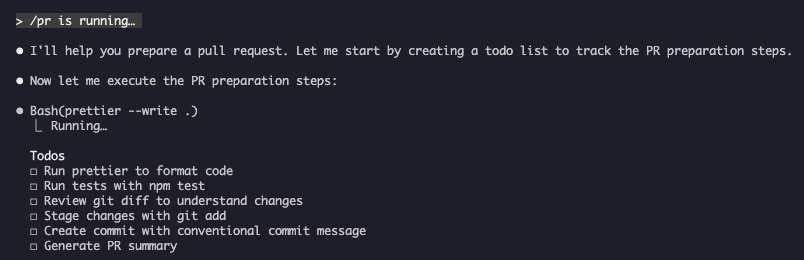
3. /generate-api-docs - API Documentation Generator
Generates comprehensive API documentation from source code.
Usage:
/generate-api-docs4. /commit - Git Commit with Context
Creates a git commit with dynamic context from your repository.
Usage:
/commit [optional message]5. /push-all - Stage, Commit, and Push
Stages all changes, creates a commit, and pushes to remote with safety checks.
Usage:
/push-allSafety Checks:
- Secrets:
.env*,*.key,*.pem,credentials.json - API Keys: Detects real keys vs. placeholders
- Large files:
>10MBwithout Git LFS - Build artifacts:
node_modules/,dist/,__pycache__/
6. /doc-refactor - Documentation Restructuring
Restructures project documentation for clarity and accessibility.
Usage:
/doc-refactor7. /setup-ci-cd - CI/CD Pipeline Setup
Implements pre-commit hooks and GitHub Actions for quality assurance.
Usage:
/setup-ci-cd8. /unit-test-expand - Test Coverage Expansion
Increases test coverage by targeting untested branches and edge cases.
Usage:
/unit-test-expandInstallation
As Skills (Recommended)
Copy to your skills directory:
# Create skills directory
mkdir -p .claude/skills

# For each command file, create a skill directory
for cmd in optimize pr commit; do
  mkdir -p .claude/skills/$cmd
  cp 01-slash-commands/$cmd.md .claude/skills/$cmd/SKILL.md
done
As Legacy Commands
Copy to your commands directory:
# Project-wide (team)
mkdir -p .claude/commands
cp 01-slash-commands/*.md .claude/commands/

# Personal use
mkdir -p ~/.claude/commands
cp 01-slash-commands/*.md ~/.claude/commands/
Creating Your Own Commands
Skill Template (Recommended)
Create .claude/skills/my-command/SKILL.md:
---
name: my-command
description: What this command does. Use when [trigger conditions].
argument-hint: [optional-args]
allowed-tools: Bash(npm *), Read, Grep
---

# Command Title

## Context

- Current branch: !`git branch --show-current`
- Related files: @package.json

## Instructions

1. First step
2. Second step with argument: $ARGUMENTS
3. Third step

## Output Format

- How to format the response
- What to include
User-Only Command (No Auto-Invocation)
For commands with side effects that Claude shouldn't trigger automatically:
---
name: deploy
description: Deploy to production
disable-model-invocation: true
allowed-tools: Bash(npm *), Bash(git *)
---

Deploy the application to production:

1. Run tests
2. Build application
3. Push to deployment target
4. Verify deployment
Best Practices
| Do | Don't |
|---|---|
| Use clear, action-oriented names | Create commands for one-time tasks |
Include description with trigger conditions | Build complex logic in commands |
| Keep commands focused on single task | Hardcode sensitive information |
Use disable-model-invocation for side effects | Skip the description field |
Use ! prefix for dynamic context | Assume Claude knows current state |
| Organize related files in skill directories | Put everything in one file |
Troubleshooting
Command Not Found
Solutions:
- Check file is in
.claude/skills/<name>/SKILL.mdor.claude/commands/<name>.md - Verify the
namefield in frontmatter matches expected command name - Restart Claude Code session
- Run
/helpto see available commands
Command Not Executing as Expected
Solutions:
- Add more specific instructions
- Include examples in the skill file
- Check
allowed-toolsif using bash commands - Test with simple inputs first
Skill vs Command Conflict
If both exist with the same name, the skill takes precedence. Remove one or rename it.
Related Guides
- Skills - Full reference for skills (auto-invoked capabilities)
- Memory - Persistent context with CLAUDE.md
- Subagents - Delegated AI agents
- Plugins - Bundled command collections
- Hooks - Event-driven automation
Additional Resources
- Official Interactive Mode Documentation - Built-in commands reference
- Official Skills Documentation - Complete skills reference
- CLI Reference - Command-line options
Last Updated: October 10, 2026 Claude Code Version: 2.1.296 Sources:
- https://code.claude.com/docs/en/output-styles
- https://code.claude.com/docs/en/skills
- https://code.claude.com/docs/en/slash-commands
- https://code.claude.com/docs/en/interactive-mode
- https://code.claude.com/docs/en/interactive-mode#review-changes-with-diff
- https://code.claude.com/docs/en/changelog
- https://code.claude.com/docs/en/commands
- https://code.claude.com/docs/en/whats-new/2026-w34
- https://code.claude.com/docs/en/model-config
- https://github.com/anthropics/claude-code/blob/main/CHANGELOG.md
- https://github.com/anthropics/claude-code/releases/tag/v2.1.139
- https://github.com/anthropics/claude-code/releases/tag/v2.1.144
- https://github.com/anthropics/claude-code/releases/tag/v2.1.152
- https://github.com/anthropics/claude-code/releases/tag/v2.1.153
- https://github.com/anthropics/claude-code/releases/tag/v2.1.154
- https://github.com/anthropics/claude-code/releases/tag/v2.1.281
- https://code.claude.com/docs/en/fast-mode
- https://github.com/anthropics/claude-code/releases/tag/v2.1.283
- https://code.claude.com/docs/en/workflows#let-claude-decide-with-ultracode
- https://github.com/anthropics/claude-code/releases/tag/v2.1.285Compatible Models: Claude Fable 5, Claude Opus 5, Claude Sonnet 5, Claude Sonnet 4.6, Claude Opus 4.8, Claude Haiku 4.5
Part of the Claude How To guide series